
Last month, I spent four hours untangling a new client’s books. Not because the transactions were complex—it was a straightforward service business. The problem was their chart of accounts. Sixty-seven expense accounts, half of them duplicates with slightly different names. “Marketing,” “Marketing Expenses,” “Advertising & Marketing,” and “Digital Ads” all sitting in the same ledger, each with a handful of transactions coded by whoever happened to be entering data that week.
The financial statements were technically balanced. The GL reconciled. But the management reports were useless. Nobody could tell how much the business actually spent on marketing because the data was scattered across four accounts that should have been one.
That’s the thing about a chart of accounts—when it’s built well, nobody notices it. When it’s built poorly, it quietly corrupts every report, every reconciliation, and every filing that touches those books.
Here’s what you’ll walk away with: a practical blueprint for designing, reviewing, and maintaining a chart of accounts that actually supports clean bookkeeping, reliable reporting, and faster month-end closes.
What Is a Chart of Accounts?
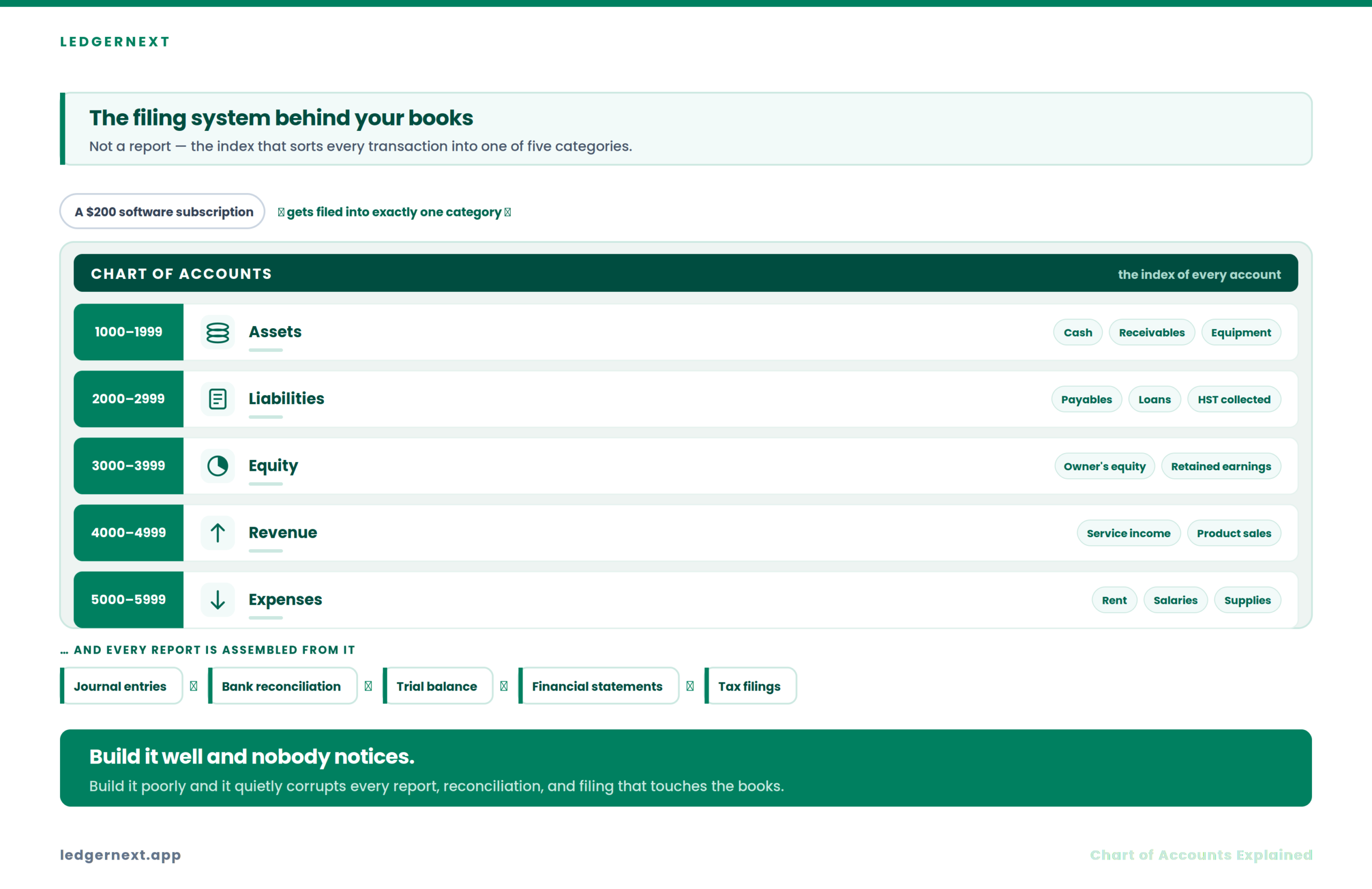
A chart of accounts (COA) is the complete index of every account in a business’s general ledger, organized by category—assets, liabilities, equity, revenue, and expenses. It’s the coding structure that determines where every transaction lands and how financial statements get assembled. Every journal entry, every bank reconciliation, every trial balance, and every tax filing flows through the COA. It’s not a report itself. It’s the architecture that makes all reports possible.
Think of it as the filing system behind your entire accounting operation. A sloppy filing system means you’ll spend hours searching for things that should take seconds.
Why the Chart of Accounts Is the Foundation of Every Accounting System
Most articles about COA design explain the five account types and move on. That misses the point entirely.
The COA isn’t just a list. It’s the structural backbone that connects:
→
Journal entries
→
General ledger
→
Trial balance
→
Financial statements
→
Tax filings & decisions
Break any link in that chain and the downstream consequences compound. I’ve seen firms lose two or three days at year-end just reclassifying transactions because the original account structure didn’t support CRA filing requirements or GST/HST reporting categories.
What this means for your firm: if you’re managing multiple client files, a weak COA doesn’t just slow down one engagement. It creates drag across your entire practice.
The Pre-Flight Check: Before You Build or Rebuild
Before touching the account structure, confirm these three things:
Stop/Go test: Can you describe, in one sentence, what the COA needs to accomplish for this specific business? If not, you’re building without a blueprint.
The FOUNDATION Framework for Building an Effective Chart of Accounts
I developed this framework after standardizing COAs across dozens of client files. It’s the sequence I follow every time, whether I’m setting up a new entity or cleaning up a mess.
Phase 1: Designing the Account Structure
Setting Up Account Categories
Start with the five core types. For each, define clear boundaries:
Visual checkpoint: When you pull up the full account list, you should see a clean hierarchy—numbered sequentially, grouped by type, with obvious gaps for future expansion.
Verification: Pull 10 random transactions from the last month. If more than two require hesitation about which account to use, your definitions aren’t clear enough.
Phase 2: Building the Numbering Schema
Reserve number ranges deliberately. I typically leave at least 10–20 open numbers between account groups within each category. That way, when a client adds a new expense type six months later, you’re inserting it logically instead of tacking it onto the end.
A five-digit system works well for most small to mid-sized businesses:
- First digit: Account type (1 = Assets, 2 = Liabilities, etc.)
- Second digit: Sub-category (e.g., 11 = Current Assets, 15 = Fixed Assets)
- Remaining digits: Specific account
Verification: Try adding a hypothetical new account. If the numbering forces an awkward placement, the schema doesn’t leave enough room for growth.
The expert nuance here: poor numbering discipline is one of those problems that looks minor on day one and becomes a structural headache eighteen months later. I’ve had to renumber entire charts because someone used sequential numbers with no gaps, and by the time the business grew, there was nowhere logical to put new accounts.
Phase 3: Naming Conventions and Policy Documentation
This is where most COAs quietly fall apart.
Two different bookkeepers code the same type of transaction to different accounts because there’s no written guidance. Over six months, that inconsistency makes the income statement noisy and budget variance analysis unreliable.
Every account needs:
- A plain-language name (no abbreviations that only one person understands)
- A one-sentence description of what belongs there
- Two or three example transactions
Verification: Ask two staff members where they’d code a specific transaction—say, a $200 software subscription. If they pick different accounts, your naming and policy documentation need work.
Phase 4: Aligning the COA with Reporting Needs
Here’s an operational insight that most articles miss entirely: build the COA around the reports leadership actually reads, not around theoretical accounting structure.
I’ve seen charts with 15 revenue subaccounts feeding into financial statements that the owner never reviews below the total revenue line. All that granularity created was more work during month-end close and more opportunities for miscoding.
Compare your budget line items to your COA lines. If the same business activity shows up in multiple places on the report, your account structure and budget structure are misaligned.
Key takeaway: Management reports are only as useful as the underlying account structure. Simpler charts often produce clearer financial statements.
The “Ugly Truth” About Chart of Accounts Maintenance
Here’s what the textbooks skip. A COA isn’t a “set it and forget it” structure. Without governance, account lists drift. Duplicates appear. Orphan accounts accumulate. And nobody notices until year-end, when the cleanup eats into billable hours.
Best Practices for Canadian Accounting Firms
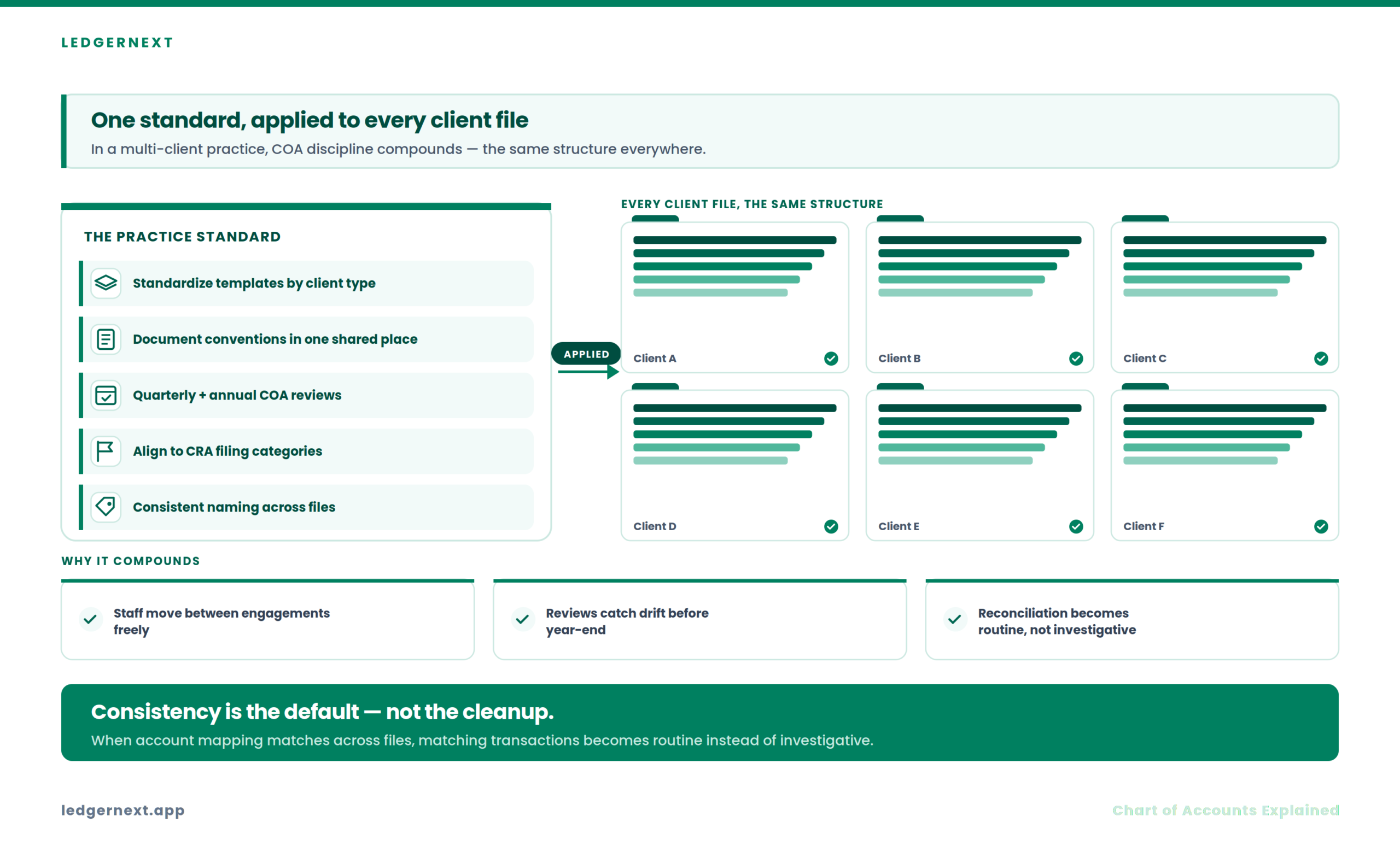
If you’re running a multi-client practice, COA discipline compounds. A few operational habits that I’ve seen make a measurable difference:
- Standardize COA templates for similar client types. A service business template and a retail template cover most engagements.
- Document account conventions in a shared location your team can reference during transaction categorization.
- Run quarterly reviews on high-volume clients and annual reviews on everyone else. Flag inactive accounts and merge duplicates.
- Align account structures with CRA filing categories from the start—retrofitting at year-end is always more expensive.
- Use consistent naming across client files so that staff switching between engagements don’t have to relearn coding conventions.
Standardized COAs also make bank reconciliation faster. When account mapping is consistent, matching transactions to the right categories becomes routine instead of investigative.
How Technology Supports Better Account Organization
A well-designed COA is an accounting decision. Software doesn’t replace that thinking—but the right platform makes it easier to enforce the structure you’ve built.
Streamline Your Accounting Workflow
LedgerNext supports accounting firms with general ledger reporting, trial balance generation, transaction categorization, and multi-client management from a single dashboard. When your COA is built right, LedgerNext helps you maintain that structure across every client file.
Platforms like LedgerNext that support rule-based categorization help enforce coding consistency—which is exactly where most COA problems start. When categorization rules map to a well-structured chart, the data flowing into your GL is cleaner before you even start the monthly review.
FAQ
How many accounts should a chart of accounts have?
There’s no universal number. A small service business might need 30–50 accounts. A multi-department company might need 100+. The right answer depends on what reports you actually produce. Every account should serve a reporting or compliance purpose—if it doesn’t appear on a report someone reads, question whether it needs to exist.
How often should you review a chart of accounts?
At minimum, annually. For high-volume clients, quarterly reviews catch dormant accounts and duplicates before they create year-end cleanup. Review timing should align with your month-end close process so cleanup doesn’t become a separate project.
What’s the difference between a chart of accounts and a general ledger?
The COA is the index—the list of all available accounts and their structure. The general ledger is the detailed record of every transaction posted to those accounts. The COA defines where transactions can go. The GL shows where they did go.
Can I change my chart of accounts mid-year?
Yes, but carefully. Adding accounts is straightforward. Merging or renaming accounts mid-year requires reclassifying historical transactions to maintain reporting consistency. Plan structural changes for the beginning of a fiscal year when possible.
How does the chart of accounts affect GST/HST reporting?
Your account structure determines how GST/HST collected and paid gets categorized. If liability accounts for tax collected aren’t separated properly, reconciling your GST/HST return against your books becomes a manual exercise. Clean account mapping reduces filing errors and speeds up CRA compliance.
Action Checklist
Ready to put this into practice?
LedgerNext helps Canadian accounting firms manage client books with consistent categorization, clean reporting, and centralized workflows.
The COA is one of those things that separates firms that scale efficiently from firms that spend every year-end cleaning up the same problems. Get the foundation right, and everything downstream—reconciliation, reporting, tax prep—gets faster. Skip it, and you’ll keep paying for that shortcut in billable hours you can’t recover.